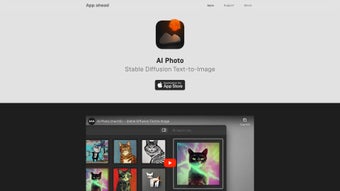

Download AI Photo – Offline Text‑to‑Image Generator, Secure AI Art Tool
Overview
AI Photo brings the power of Stable Diffusion directly to your Apple ecosystem. Unlike many cloud‑based generators, AI Photo runs completely offline, meaning every prompt you type is processed on your own device. This design not only guarantees lightning‑fast response times on Apple Silicon chips but also safeguards your privacy – no data leaves your iPhone, iPad, or Mac.
Whether you are a casual creator looking for a quick visual sketch or a professional designer seeking high‑resolution concept art, AI Photo offers an intuitive interface, robust safety filters, and deep integration with macOS, iOS, and iPadOS. The app’s ability to import custom CoreML models further expands its creative potential, allowing you to tailor the diffusion process to your specific style or brand guidelines. With built‑in organization tools, favorites, and a powerful search engine, your generated artworks stay neatly cataloged, ready for export or further refinement.
In short, AI Photo is a privacy‑first, high‑performance, and feature‑rich solution for anyone who wants to turn text into stunning images without relying on an internet connection.
Beyond the core generation engine, AI Photo includes a suite of productivity enhancements. The “Prompt History” panel records every command you issue, enabling you to revisit and remix earlier ideas with a single click.
The “Batch Export” option, available after a small in‑app purchase, lets you generate multiple variations of a single prompt and automatically save them to a dedicated folder in the Files app. For educators and students, the app supports a “Classroom Mode” that restricts certain content filters and provides a shared library for collaborative projects. All of these layers are built on top of Apple’s secure sandbox environment, ensuring that third‑party extensions cannot access your personal data.
By combining cutting‑edge AI with Apple‑centric design principles, AI Photo positions itself as a versatile creative companion for both hobbyists and enterprise users who demand both speed and confidentiality.
Key Features
- Fully offline generation powered by Stable Diffusion on Apple Silicon.
- Native support for iOS, iPadOS, and macOS with optimized performance.
- Safety mechanisms that block harmful or offensive content.
- Custom CoreML model import on Mac for personalized diffusion pipelines.
- High‑resolution output up to 2048 × 2048 px.
- Intelligent artwork organizer with favorites, tags, and searchable library.
- One‑click sharing to Photos, Files, or external apps.
- Dark mode UI that adapts to system appearance.
- Energy‑efficient processing that respects battery life on mobile devices.
- Free download with optional in‑app purchases for premium model packs.
Each of these features is crafted with the Apple user in mind. The offline engine eliminates latency, so you see results in seconds rather than waiting for a server round‑trip. Safety filters are constantly updated, ensuring that the tool remains a responsible creative partner.
The ability to load custom CoreML models opens the door for niche use‑cases – think brand‑specific color palettes, unique artistic styles, or experimental research workflows. Meanwhile, the built‑in organizer acts like a personal gallery, making it simple to revisit past prompts, compare variations, or build a portfolio without leaving the app.
The “Prompt Variations” slider lets you generate multiple creative takes on a single description, each with a distinct seed, while the “Guidance Strength” control balances fidelity to the prompt against artistic freedom.
For power users, the “Advanced Settings” pane reveals low‑level parameters such as diffusion steps, sampler type, and noise schedule, mirroring the flexibility found in desktop‑grade AI tools. Integration with Apple’s Share Sheet means you can instantly send a generated image to messaging apps, social networks, or note‑taking tools without leaving the workflow. Finally, the optional premium model packs provide curated aesthetic styles—ranging from hyper‑realistic photography to stylized comic art—so you can quickly switch moods without training your own model.
Installation, Usage & Compatibility
Getting started with AI Photo is straightforward. Open the App Store on your iPhone, iPad, or Mac, search for “AI Photo,” and tap Get. The download is free, and the installation process follows the standard Apple guidelines – no additional permissions or sign‑ups are required. Once installed, launch the app and grant access to your photo library if you intend to export images directly to the Photos app.
The first screen presents a clean text box where you type your prompt. AI Photo supports natural‑language descriptions, so you can write “a serene mountain landscape at sunrise, pastel colors” and let the model interpret the details. Below the prompt field, sliders let you adjust guidance strength, image size, and the number of diffusion steps, giving you fine‑grained control over the final output. After configuring the settings, hit Generate and watch the animation of the diffusion process unfold in real time.
AI Photo is compatible with iOS 15 or later, iPadOS 15 or later, and macOS 12 Monterey or newer. The app is specially optimized for Apple Silicon (M1, M2, and later) but also runs on Intel‑based Macs, albeit with slightly longer processing times. Because the engine runs locally, there is no need for an internet connection after the initial download, making it ideal for travel, classrooms, or secure environments where data transmission is restricted.
For power users on macOS, you can drag and drop custom CoreML model files into the “Models” folder within the app’s sandbox. AI Photo will automatically detect the new model and list it among the selectable options. This extensibility means you can experiment with community‑crafted diffusion variants or even train your own model using tools like Apple’s Create ML, then import it for instant generation.
The app also includes a “Performance Monitor” overlay that displays GPU and CPU usage in real time, helping you understand the resource impact of high‑resolution renders. If you run into memory constraints on older hardware, the “Low‑Memory Mode” automatically reduces the diffusion steps while preserving core visual fidelity. All of these usability touches are designed to make AI Photo feel native to the Apple ecosystem, whether you are working on a pocket‑sized iPhone or a powerful MacBook Pro.
Pros & Cons
Pros
- Completely offline – total privacy and zero latency.
- Optimized for Apple Silicon, delivering fast generation on modern devices.
- Robust safety filters keep content appropriate.
- Custom CoreML model support enables deep personalization.
- Intuitive UI suitable for beginners and pros alike.
- Built‑in organization tools simplify asset management.
- Prompt history and batch export streamline creative workflows.
- Energy‑efficient processing conserves battery life on mobile devices.
Cons
- Limited to Apple devices; no Windows or Android version.
- High‑resolution generation can be resource‑intensive on older Intel Macs.
- Free version includes occasional prompts for premium model packs.
- Advanced features (e.g., batch generation) require in‑app purchases.
- Learning curve for custom CoreML model integration.
- Some users may find the UI overly minimalistic for complex workflows.
Frequently Asked Questions
Is AI Photo truly offline, or does it need an internet connection?
AI Photo processes every prompt locally on your device. An internet connection is only required for the initial download and optional updates; after that, all generation occurs offline.
Can I use AI Photo on a Windows PC?
No, AI Photo is currently exclusive to Apple platforms (iOS, iPadOS, macOS). A Windows version may be considered in future releases, but it is not available today.
How do I import a custom CoreML model?
On macOS, open the AI Photo app, navigate to Settings → Models, and drag your .mlmodel file into the designated area. The app will validate and list the model for selection in the generation screen.
Are there any hidden fees or subscriptions?
The core application is free to download and use. Premium model packs and advanced batch‑generation features are offered as optional in‑app purchases, but they are not required for basic functionality.
What image resolutions can AI Photo generate?
AI Photo supports outputs up to 2048 × 2048 pixels. Higher resolutions may be limited on older hardware due to memory constraints.
Is there a way to share generated images directly to social media?
Yes. After an image is generated, the Share button opens the iOS/macOS Share Sheet, allowing you to post instantly to Instagram, Twitter, Facebook, or any other app that supports image sharing.
Conclusion & Call to Action
AI Photo sets a new benchmark for privacy‑centric, high‑performance AI art creation on Apple devices. By keeping the diffusion process offline, it eliminates the latency and data‑privacy concerns that plague many cloud‑based generators, while still delivering the vivid, detailed imagery that Stable Diffusion is known for. Whether you are a hobbyist looking to experiment with surreal concepts or a professional designer needing rapid prototyping, AI Photo offers a seamless, secure, and customizable workflow that fits naturally into the Apple ecosystem.
The combination of offline speed, robust safety filters, and deep CoreML integration makes AI Photo a compelling choice for creators who value both artistic freedom and data sovereignty. Its intuitive UI shortens the learning curve, while advanced users can dive into low‑level settings or import bespoke models to push the boundaries of what’s possible on a mobile device. Although the platform is currently limited to iOS, iPadOS, and macOS, the focused optimization for Apple Silicon ensures that every generation feels instant and fluid.
Ready to unleash your imagination without compromising your data? Download AI Photo now from the App Store, explore the built‑in safety filters, and start turning words into visual masterpieces today.
Pros: Offline privacy, Apple Silicon speed, custom model support.
Cons: Apple‑only, premium features optional cost.



.png)



